RPGMT - lamp with dynamic shadows
A downloadable tool
RPGMT Lamp Plugin for RPG Maker MZ
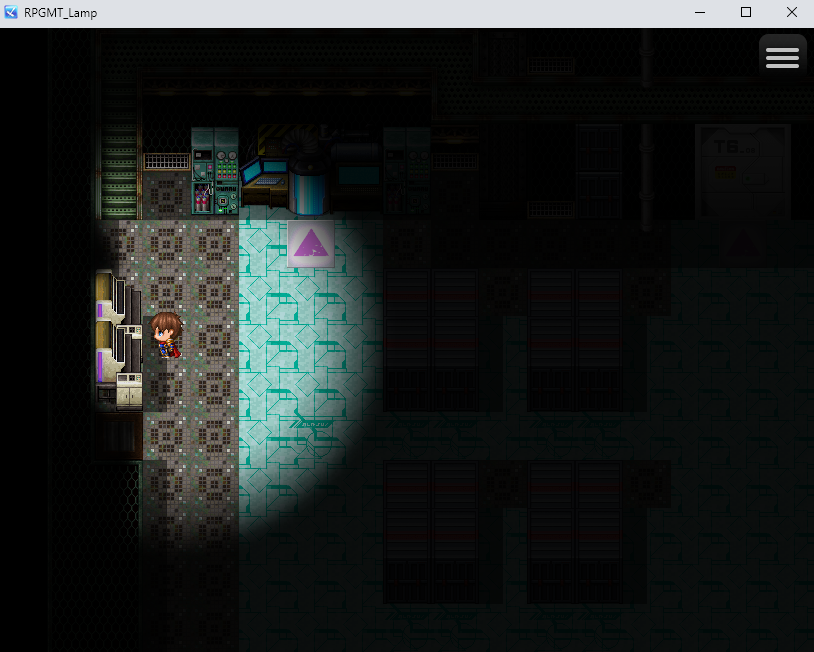
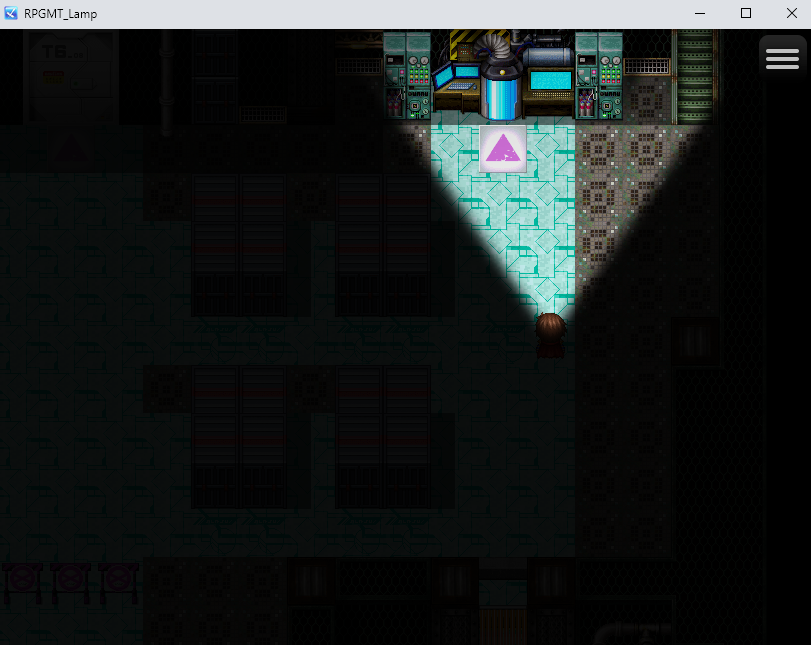
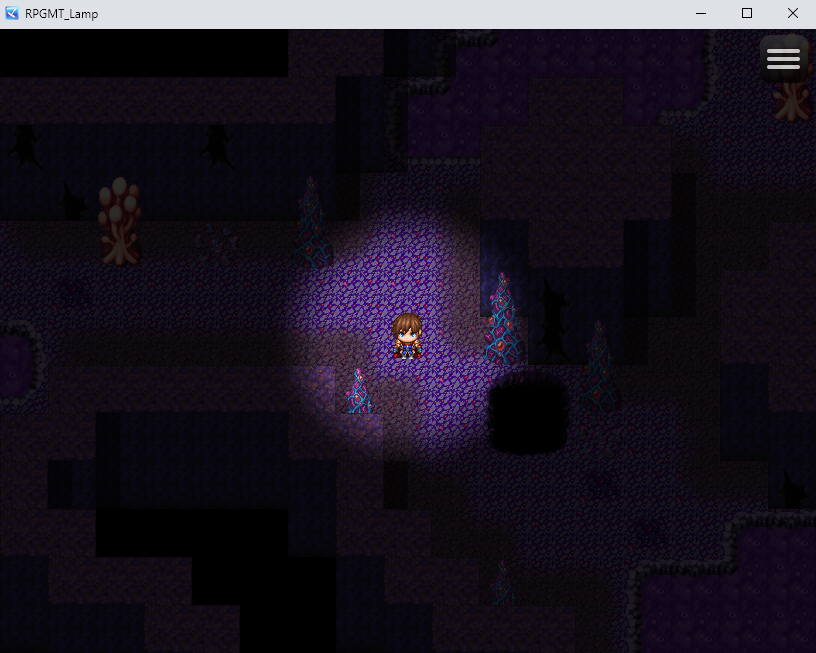
RPGMT Lamp is a focused lighting and shadow plugin for RPG Maker MZ. It adds a configurable player light source to your game and allows you to create dark maps, flashlight effects, lantern light, vision cones and object-based shadows.
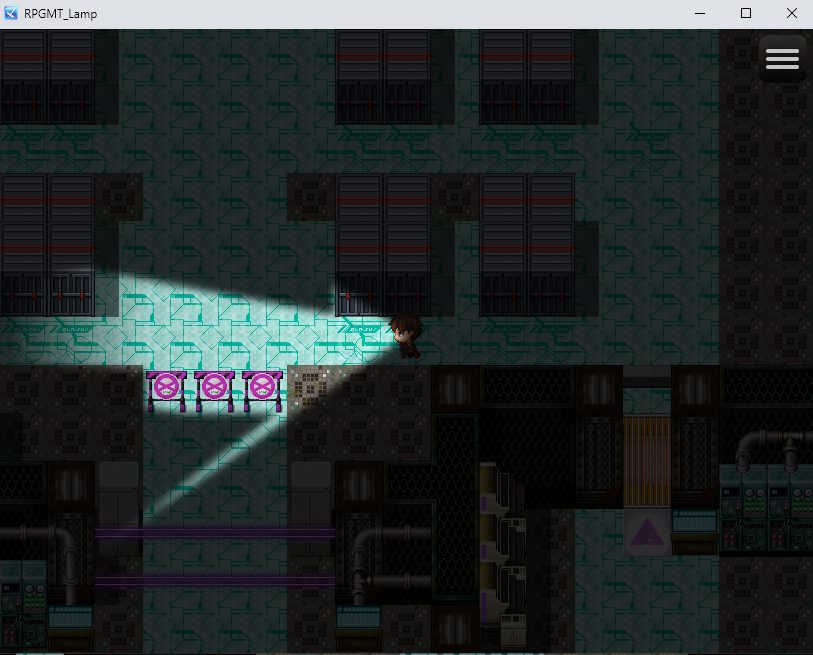
The main focus of this plugin is not just placing a simple light circle on the map. Instead, the player's light can be blocked by walls, events, trees, objects and region IDs, creating a much more believable shadow effect.
RPGMT Lamp is designed for games that need a strong and focused player light system, especially for caves, forests, horror maps, stealth sections, dark buildings, dungeons, night scenes and flashlight mechanics.
Key Features
- Create a darkness overlay on your map
- Add a configurable player light source
- Choose between circle light, cone light or no player light
- Create flashlight-style cone lighting
- Create lantern-style circle lighting
- Real object-based shadow blocking
- Walls can block the player light
- Events can block the player light
- Sprite events can block light automatically
- Passable object tiles can be handled intelligently
- Region IDs can be used as manual light blockers
- Soft light edges
- Optional player light flicker
- Performance settings for different project needs
- In-game light detail option for players
- Plugin Commands for changing lighting during gameplay
Real Object-Based Shadows
RPGMT Lamp is built around object-based shadow blocking.
This means the player's light does not simply pass through everything. Objects can interrupt the light and create shadows behind them.
For example:
- A wall can stop the flashlight beam
- A house can block the player's cone light
- A tree can cast a shadow inside the visible area
- An NPC or object event can block the light
- Region IDs can be used to manually define shadow areas
This makes dark maps feel more natural and gives the player light more physical presence.
Player Light Modes
Circle Light
Circle mode creates a round light area around the player.
This is useful for:
- Lanterns
- Torches
- Caves
- Night maps
- Dark rooms
- Limited visibility areas
Circle lights can also be blocked by objects and walls.
Cone Light
Cone mode creates a directional light beam in front of the player.
This is useful for:
- Flashlights
- Stealth vision cones
- Horror games
- Search lights
- Exploration scenes
- Dark fantasy maps
The cone follows the player's direction and can be adjusted with offset settings.
None
You can also disable the player light completely. This is useful for cutscenes, special dark scenes or maps where the player should not emit light.
Shadow Blocking System
The player's light can be blocked by different types of objects:
- Non-passable wall tiles
- Events
- Sprite events
- Passable object tiles
- Region IDs
The plugin includes several settings to control how objects should interact with light. This allows you to decide whether decorative objects, passable objects or specific regions should block the light.
Passable Object Handling
RPGMT Lamp includes special handling for passable object tiles.
Some objects in RPG Maker are visually large but still placed on passable tiles. For example, columns, arches or foreground decorations may look solid, but the player can walk behind them.
The plugin can ignore fully passable object tiles automatically, so these objects do not always block the full light beam. If you want a passable object to block light anyway, you can mark the tile manually with a Blocking Region ID.
Animated Event Handling
Animated events such as torches or flames can be expensive to calculate if every visible pixel is checked every frame.
RPGMT Lamp can treat stepping-animation events as fast rectangle blockers. This allows animated events to block light more efficiently without causing heavy performance drops.
This is especially useful for:
- Torches
- Flames
- Animated decorations
- Tile-image events
Manual Light Blockers
You can force an event to block the player's light by adding this event comment:
<RPGMT_BlockLight>
This is useful for invisible blockers, special obstacles, doors or objects that should always cast a shadow.
In-Game Light Detail Option
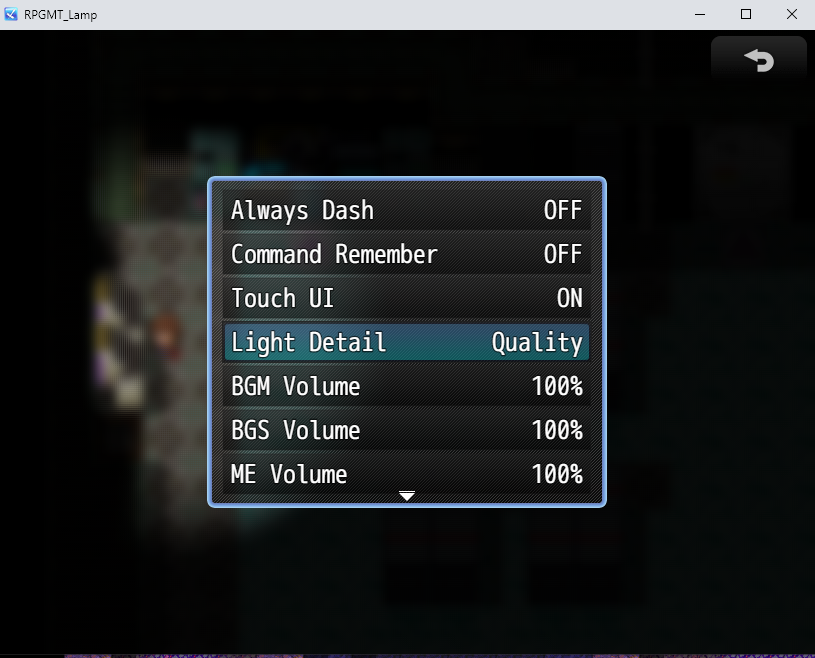
RPGMT Lamp can add a light detail setting to the normal in-game Options menu.
The player can choose between:
- Performance - better performance, less shadow precision
- Balanced - recommended default
- Quality - more precise shadows, higher performance cost
The option name can be changed in the Plugin Manager. For example, you can rename it to Light Detail, Lighting Quality or Lichtqualität.
Plugin Commands
RPGMT Lamp includes Plugin Commands for changing lighting during gameplay.
- Enable or disable the complete light system
- Change darkness opacity
- Change the player light mode
- Change the player light radius
- Change cone length and angle
- Enable or disable light blocking
- Reset settings back to Plugin Manager defaults
This makes it possible to create gameplay effects like:
- Turning a flashlight on or off
- Switching between lantern and flashlight mode
- Increasing darkness inside caves
- Disabling the light during cutscenes
- Changing visibility during stealth sections
Performance Options
RPGMT Lamp includes several settings to balance visual quality and performance.
You can adjust:
- Circle ray density
- Cone ray density
- Ray step precision
- Light edge softness
- Object tile blocking behavior
- Animated event blocker behavior
For better performance, you can use larger ray steps or the Performance light detail preset. For better shadow precision, you can use smaller ray steps or the Quality preset.
Recommended starting values:
Light Detail: Balanced
Player Light Mode: cone
Player Cone Length: 260
Player Cone Angle: 70
Light Edge Feather: 4 to 6
Cone Ray Step Degrees: 2
Ray Step Pixels: 8
Object Tile Fast Bounds: true
Stepping Events Block Light: true
Good For
- Horror games
- Stealth games
- Dark fantasy games
- Dungeon crawlers
- Cave maps
- Forest maps
- Night maps
- Flashlight mechanics
- Lantern mechanics
- Player vision cone systems
Important Note
RPGMT Lamp is a focused player-light plugin. It is not designed as a large multi-light engine with many simultaneous light sources.
The goal of this plugin is to provide a strong, easy-to-use player lamp, flashlight and vision cone system with object-based shadows and practical performance options.
Compatibility
This plugin is made for RPG Maker MZ.
Terms of Use
You may use this plugin in personal and commercial RPG Maker MZ projects.
Credit:
RPG Maker Tutorials
YouTube:
https://www.youtube.com/@rpgmakertutorials3639
itch.io:
https://aerobiba.itch.io/rpgmt-lamp-plugin
Legal / Imprint
Imprint / Impressum:
David Kristall
David Kristall Softwareentwicklung
Solbergweg 20
44225 Dortmund
Germany
Contact:
E-Mail: rpgmt.dev@gmail.com
Purchase
In order to download this tool you must purchase it at or above the minimum price of $4.99 USD. You will get access to the following files:
Leave a comment
Log in with itch.io to leave a comment.