RPGMT - Mailbox Plugin
A downloadable tool
RPGMT Mailbox Plugin for RPG Maker MZ
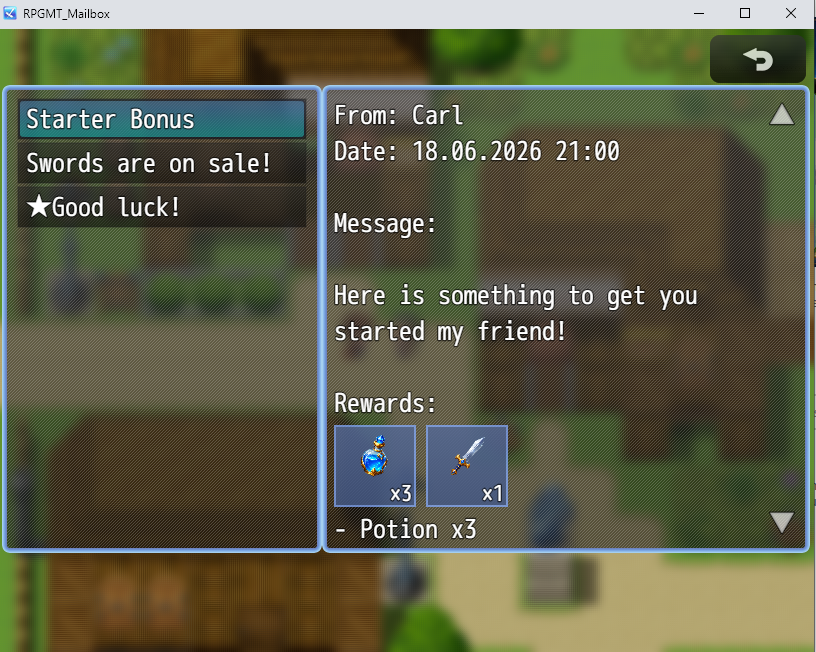
RPGMT Mailbox adds a clean and flexible mailbox system to your RPG Maker MZ project. It allows you to send messages to the player, display them in a dedicated mailbox scene and optionally attach rewards such as items, weapons, armors or gold.
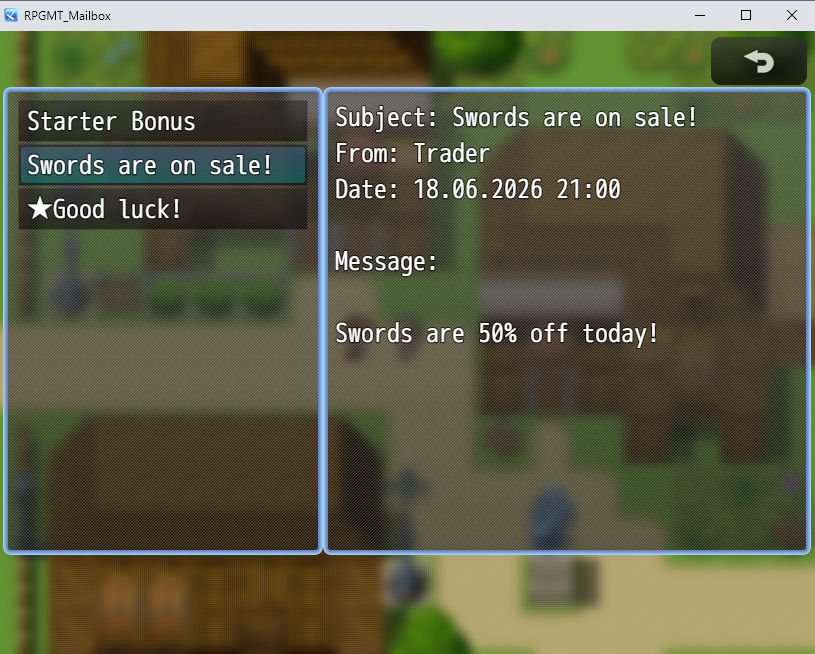
The mailbox scene is divided into two clear sections:
- Left side: a list of all received mail subjects
- Right side: the selected mail content with subject, sender, date, message and optional rewards
This makes the plugin useful for story letters, quest messages, tutorials, reward messages, NPC communication, system notices, announcements and many other in-game message systems.
Features
- Adds a dedicated mailbox scene to RPG Maker MZ
- Optional mailbox command in the main menu
- Displays mail subjects on the left side
- Displays the selected mail content on the right side
- Supports subject, sender and date information
- Supports read and unread mail status
- Optional unread prefix, for example a star symbol
- Long mail texts can be scrolled
- Supports mouse, keyboard and controller input
- Mail data is saved with the normal RPG Maker save file
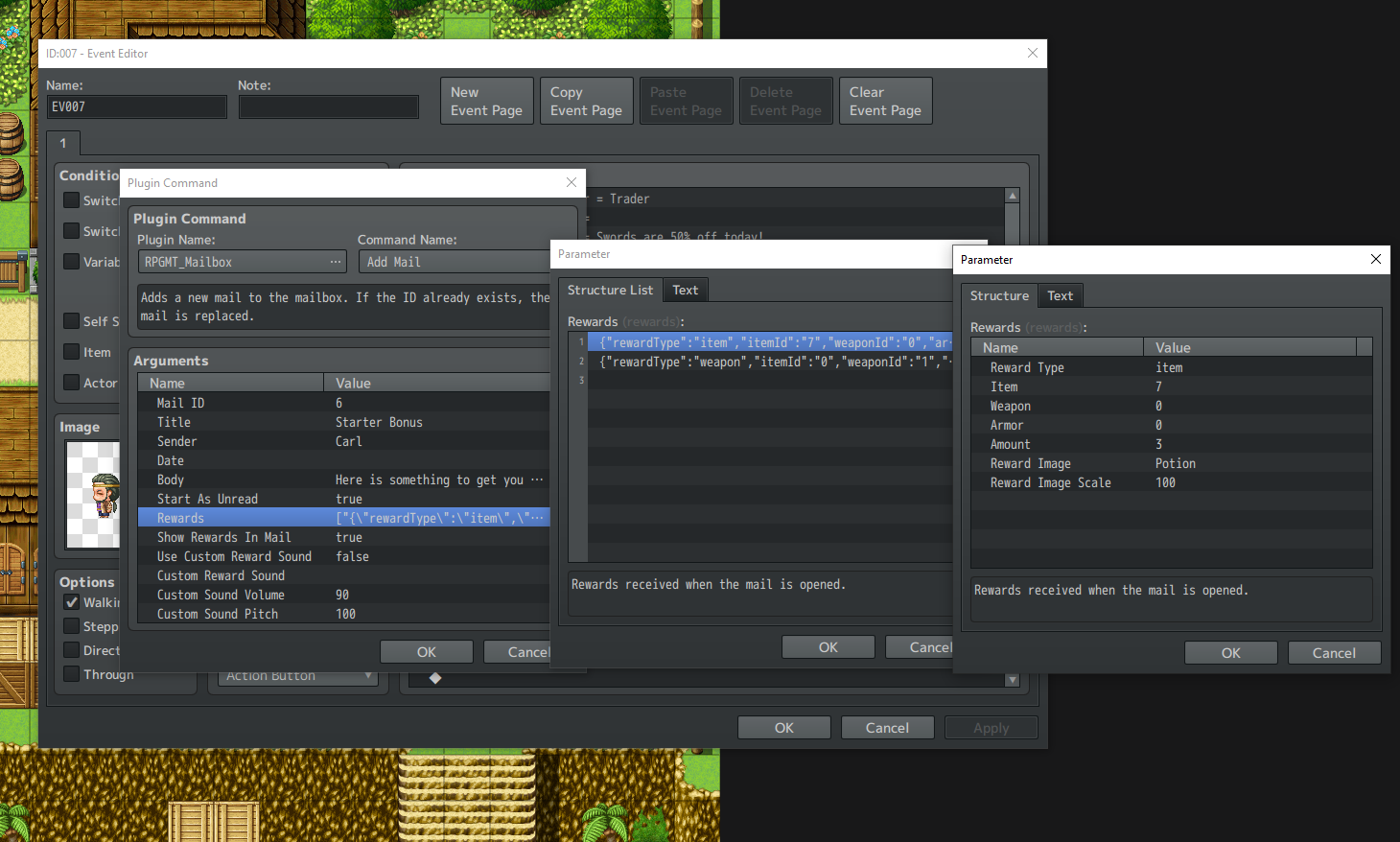
- Add mails through Plugin Commands
- Remove specific mails through Plugin Commands
- Clear the entire mailbox through Plugin Commands
- Mark mails as read or unread through Plugin Commands
- Supports optional rewards attached to mails
- Rewards can be items, weapons, armors or gold
- Unlimited rewards can be added to a single mail
- Rewards are received when the mail is opened
- Rewards can only be received once per mail
- You can decide whether rewards are shown inside the mail content
- Supports custom reward images from
img/pictures - Uses database icons automatically if no custom reward image is selected
- Supports a global reward sound effect
- Supports custom reward sounds per mail
- Reward box colors can use the current menu colors
- Reward box colors can also be customized manually
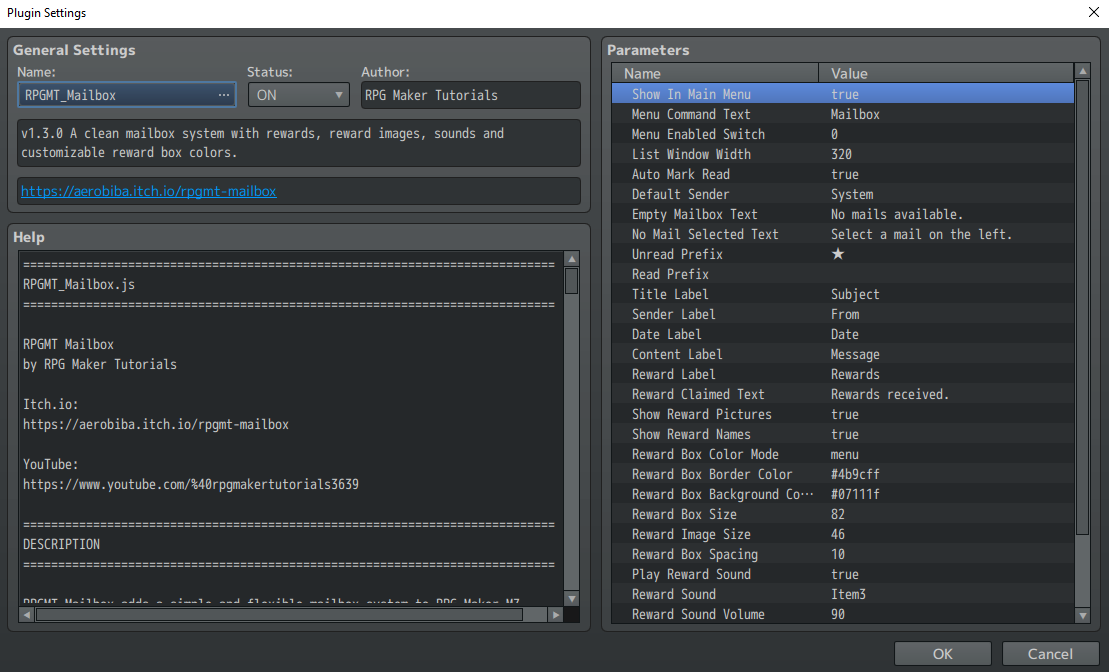
- Customizable labels and menu text through plugin parameters
Reward System
RPGMT Mailbox includes an optional reward system. Each mail can contain one or more rewards that the player receives when opening the mail.
Supported reward types:
- Items
- Weapons
- Armors
- Gold
You can add as many rewards as you want to a single mail. For example, one mail can give the player gold, potions and a weapon at the same time.
Rewards are only given once. If the player opens the same mail again, the reward will not be duplicated.
You can also decide per mail whether the reward list should be visible inside the mail. This allows you to create visible reward messages or hidden reward mails.
Reward Images
Rewards can be displayed with images directly inside the mail content.
Custom reward images must be placed in:
img/pictures/
If you select a custom image for a reward, that image will be shown inside the reward box.
If no custom image is selected, the plugin automatically uses the database icon of the selected item, weapon or armor.
This makes it easy to create visually appealing reward mails without needing custom images for every reward.
Reward Sounds
RPGMT Mailbox can play a sound effect when the player receives rewards from a mail.
You can set a global reward sound in the plugin parameters. You can also define a custom reward sound for individual mails.
Sound effects must be placed in:
audio/se/
Volume, pitch and pan can be adjusted through the plugin settings.
Reward Box Customization
The reward boxes can be customized to match the style of your game.
You can choose between:
- Menu Colors: uses the current RPG Maker MZ window and menu colors
- Custom Colors: uses your own selected border and background colors
This allows the reward boxes to either blend naturally into your current menu style or use a custom look for a more unique presentation.
Example Uses
- Send story letters to the player
- Create quest reward mails
- Send tutorial information
- Notify the player about unlocked features
- Create NPC letters or faction messages
- Send system announcements
- Give starter bonuses
- Create login-style rewards inside your game
- Store important information the player can read again later
- Reward the player after quests, battles or story progress
Controls
The mailbox supports mouse, keyboard and controller input.
- Up / Down: select a mail
- OK / Enter / Confirm: open the selected mail and claim rewards
- Cancel / Escape: close the mailbox
- Left / Right: scroll the mail content
- PageUp / PageDown: scroll faster
- Mouse Wheel: scroll the mail content with the mouse
Plugin Commands
The plugin includes several Plugin Commands for easy event integration.
- Add Mail: adds a new mail to the mailbox
- Open Mailbox: opens the mailbox scene
- Remove Mail: removes a specific mail by Mail ID
- Clear Mailbox: removes all mails
- Mark Mail Read: marks a mail as read
- Mark Mail Unread: marks a mail as unread
Each mail can use a unique Mail ID. This is helpful if you want to remove, replace or update a specific mail later in your game.
Installation
- Download the plugin file.
- Copy RPGMT_Mailbox.js into your project folder:
js/plugins/
- Open the RPG Maker MZ Plugin Manager.
- Add and enable RPGMT_Mailbox.
- Configure the plugin parameters if needed.
- Use Plugin Commands to add mails or open the mailbox.
Customization
Several texts and settings can be changed through plugin parameters, including:
- Main menu command text
- Default sender name
- Empty mailbox text
- Unread mail prefix
- Subject label
- Sender label
- Date label
- Message label
- Reward label
- Reward claimed text
- Reward image display
- Reward box size
- Reward image size
- Reward box spacing
- Reward box color mode
- Reward box border color
- Reward box background color
- Reward sound effect
- Reward sound volume, pitch and pan
- Scroll speed for keyboard/controller input
Compatibility
This plugin is made for RPG Maker MZ.
If you use other plugins that modify the main menu, place this plugin below those menu-related plugins if needed.
If there is a conflict with another menu plugin, you can disable the mailbox command in the main menu and open the mailbox only through the Plugin Command instead.
Terms of Use
- Can be used in commercial and non-commercial RPG Maker MZ projects.
- You may edit the plugin for use in your own project.
- You may not redistribute, resell or share the plugin file as a standalone product.
- You may not claim the plugin as your own.
- Credit is appreciated but not required unless stated otherwise on this page.
Support & Updates
For tutorials, updates and more RPG Maker content, visit:
YouTube:
https://www.youtube.com/%40rpgmakertutorials3639
Itch.io:
https://aerobiba.itch.io/rpgmt-mailbox
Version
Current Version: 1.3.0
- Mailbox scene with subject list and content window
- Read/unread mail support
- Keyboard, controller and mouse scrolling
- Plugin Commands for adding and managing mails
- Reward support for items, weapons, armors and gold
- Optional reward display inside mails
- Custom reward images from
img/pictures - Automatic database icon display for rewards
- Global and per-mail reward sounds
- Customizable reward box colors
Legal / Imprint
Imprint / Impressum:
David Kristall
David Kristall Softwareentwicklung
Solbergweg 20
44225 Dortmund
Germany
Contact:
E-Mail: rpgmt.dev@gmail.com
Purchase
In order to download this tool you must purchase it at or above the minimum price of $3.99 USD. You will get access to the following files:
Leave a comment
Log in with itch.io to leave a comment.