RPGMT - Pixel Movement Plugin
A downloadable tool
RPGMT Pixel Movement Plugin for RPG Maker MZ
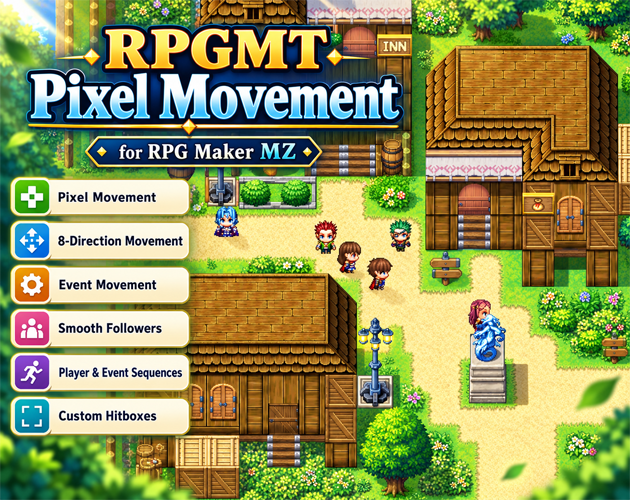
RPGMT Pixel Movement replaces RPG Maker MZ's standard tile-by-tile movement with smooth sub-tile movement while keeping the familiar RPG Maker map, event and collision systems.
It combines precise player movement, 8-direction controls, event pixel movement, follower trails, custom hitboxes and powerful movement sequences in a single plugin.
The plugin is designed for developers who want smoother and more precise movement without replacing the entire RPG Maker workflow.
Key Features
- True sub-tile / pixel movement for the player
- Optional 8-direction movement
- Normalized diagonal movement speed
- Pixel movement for events
- Smooth pixel-based follower movement
- Follower trail system without visible snapping
- Adaptive follower catch-up
- Custom player hitboxes
- Custom event hitboxes
- Event-specific hitboxes through comments
- Pixel-aware Player Touch and Event Touch detection
- Precise movement distances such as 0.25, 0.5 or 1.75 tiles
- Relative X/Y movement
- Absolute map-position movement
- Player movement sequences
- Event movement sequences
- Random movement
- Approach Player movement
- Move Away From Player movement
- Wait and Turn sequence commands
- Custom JavaScript inside movement sequences
- Compatible with normal RPG Maker MZ movement routes
Pixel Movement
Characters are no longer limited to whole tile positions.
Instead of moving like this:
10 → 11 → 12
the player can move through fractional positions:
10.00
10.08
10.16
10.24
10.32
...
11.00
This allows much smoother and more natural movement while still using RPG Maker MZ's tile passability system.
8-Direction Movement
The player can move in all eight standard directions:
7 8 9
4   6
1 2 3
Diagonal speed can be normalized so diagonal movement is not faster than horizontal or vertical movement.
No special 8-direction character graphics are required. Standard RPG Maker MZ character sheets continue to work.
Custom Player Hitbox
The player collision area can be configured independently from the visual sprite.
Available settings include:
- Hitbox Width
- Hitbox Height
- Offset X
- Offset Y
This makes it possible to place the collision area around the character's feet instead of treating the full sprite as solid.
Custom Event Hitboxes
Events can use global default hitboxes or individual hitboxes through event comments.
Example:
<PixelHitbox: 0.70, 0.60>
With offsets:
<PixelHitbox: 0.70, 0.60, 0.00, 0.15>
The format is:
<PixelHitbox: width, height, offsetX, offsetY>
This is useful for NPCs, boxes, trees, narrow objects and other events where the default collision area is too large or too small.
Event Pixel Movement
Events can also use smooth sub-tile movement.
Normal RPG Maker movement commands remain usable, including:
- Move Up
- Move Down
- Move Left
- Move Right
- Diagonal movement
- Move Random
- Move Toward Player
- Move Away From Player
- Custom Move Routes
Pixel Movement can also be disabled for an individual event page:
<PixelMovement: off>
Or explicitly enabled:
<PixelMovement: on>
Smooth Followers
Followers use a recorded movement trail instead of repeatedly targeting whole tile positions.
This improves:
- Diagonal movement
- Sharp turns
- Curved paths
- Follower spacing
- Visual smoothness
Followers can also temporarily increase their movement speed when they fall behind and automatically return to normal speed once they catch up.
Precise Player Movement
The plugin includes several Plugin Commands for precise player movement.
Pixel Move Player
Move the player in one of eight directions by an exact distance.
Example:
Direction: Right
Distance: 0.25
This moves the player exactly 0.25 tiles to the right.
Pixel Move Player Offset
Move the player relative to the current position using exact X/Y offsets.
Example:
Offset X: 0.50
Offset Y: -0.25
This moves the player 0.5 tiles to the right and 0.25 tiles upward.
Pixel Move Player To Position
Move the player to an exact map coordinate.
Example:
X: 12.50
Y: 8.25
Player Movement Sequences
The Pixel Move Player Sequence command allows you to create complete movement sequences inside one Plugin Command.
Available sequence entries:
- Move Direction
- Random
- Offset X/Y
- Move To Position
- Wait
- Turn
- Custom Script
Example:
Move Right 0.50
Wait 20
Move Down 1.25
Turn Left
Wait 30
Move Left 0.25
Manual player input is disabled while a player sequence is active so the sequence cannot be interrupted by normal controls.
Sequences can also repeat continuously.
A separate Stop Player Sequence Plugin Command can stop repeating routes and return control to the player.
Event Movement Sequences
The Pixel Move Event Sequence command allows multiple event movement instructions to be created inside one Plugin Command.
Available movement types:
- Move Direction
- Random
- Approach Player
- Move Away From Player
- Offset X/Y
- Move To Position
- Wait
- Turn
- Custom Script
Example patrol route:
Move Right 1.50
Wait 30
Move Down 0.50
Move Left 1.50
Wait 30
Move Up 0.50
Enable Repeat Sequence to create a continuously repeating movement pattern.
You can also create simple autonomous behavior such as:
Random
Repeat Sequence: Yes
or:
Approach Player
Repeat Sequence: Yes
Please note that Approach Player uses direct movement and does not include pathfinding.
Custom Scripts
Movement sequences can run custom JavaScript.
Inside an Event Sequence, this refers to the event.
Example:
this.rpgmtMovePixel(6, 0.35);
Other examples:
this.moveRandom();
this.moveTowardPlayer();
Inside a Player Sequence, this refers to the player.
Move Route Script Calls
The following methods can also be used in normal RPG Maker MZ Movement Route Script commands.
Move by direction
this.rpgmtMovePixel(direction, distance);
Examples:
this.rpgmtMovePixel(6, 0.25);
this.rpgmtMovePixel(8, 1.50);
this.rpgmtMovePixel(3, 0.75);
Move by X/Y offset
this.rpgmtMovePixelXY(0.50, -0.25);
Move to exact map position
this.rpgmtMovePixelTo(12.50, 8.25);
The Movement Route waits until the precise movement has completed before processing the next route command.
Touch Events
Player Touch and Event Touch use the configured pixel hitboxes.
A configurable Touch Trigger Margin can slightly increase the contact area to make event activation feel more natural.
If a moving NPC enters the player's collision area, the player is still allowed to move out of the overlap. This prevents moving events from trapping the player.
Follower Settings
Follower behavior can be configured with:
- Follower Spacing
- Trail Sample Distance
- Trail Queue Limit
- Adaptive Catch-Up
- Catch-Up Start Distance
- Full Catch-Up Distance
- Maximum Catch-Up Multiplier
Compatibility API
The plugin creates:
window.RPGMT.PixelMovement
Example:
if (window.RPGMT?.PixelMovement?.isAvailable()) {
    // RPGMT Pixel Movement is installed
}
Available helper examples include:
window.RPGMT.PixelMovement.playerPosition();
window.RPGMT.PixelMovement.playerHitbox();

window.RPGMT.PixelMovement.startPlayerSequence(steps, options);
window.RPGMT.PixelMovement.cancelPlayerSequence();

window.RPGMT.PixelMovement.startEventSequence(eventId, steps, options);
window.RPGMT.PixelMovement.cancelEventSequence(eventId);
This API can be used by future RPGMT movement extensions or other compatible plugins.
Important Notes
- Designed for RPG Maker MZ.
- Uses rectangular hitboxes, not sprite alpha-pixel collision.
- Uses RPG Maker MZ's normal tile passability as the map collision basis.
- Pathfinding is not included.
- Approach Player can still be blocked by walls.
- Event comment settings apply to the current event page.
- Event ID 0 refers to the event currently executing the Plugin Command.
Version 1.2.3
- Pixel Movement for player and events
- 8-direction movement
- Pixel follower trail system
- Player and event movement sequences
- Precise hitboxes and offsets
- Fractional movement distances
- Custom movement scripts
- Player overlap escape handling
Links & Support
Plugin Page:
https://aerobiba.itch.io/rpgmt-pixel-movement-plugin
YouTube:
https://www.youtube.com/%40rpgmakertutorials3639
Discord:
https://discord.gg/XDdyj3PM
Created by RPG Maker Tutorials.
AI Assistance Disclosure
AI was used as a development assistant for parts of the code, page text, and promotional graphics. The plugin concept, feature direction, testing, RPG Maker MZ setup, documentation review, bug fixing, and final release decisions were handled manually.
Legal / Imprint
Imprint / Impressum:
David Kristall
David Kristall Softwareentwicklung
Solbergweg 20
44225 Dortmund
Germany
Contact:
E-Mail: rpgmt.dev@gmail.com
Purchase
In order to download this tool you must purchase it at or above the minimum price of $3.99 USD. You will get access to the following files:
Leave a comment
Log in with itch.io to leave a comment.